REDACTBLOCK
Secrets & credentials
Dozens of API key and token formats, plus passwords typed into a conversation.
Mesh runs on your computer and checks what your AI coding tools send. Secrets and personal data are redacted or blocked before they reach the AI provider.
{"event": "decision", "verdict": "redact", "redacted": true}{"event": "decision", "verdict": "redact", "redacted": true}{"event": "decision", "verdict": "allow", "redacted": false}Illustrative inspection
See how Mesh redacts sensitive data, blocks a request under Strict policy, and lets a clean request through. These examples use synthetic data.
An engineer includes a fake AWS secret key in a Claude Code prompt. With Balanced policy, Mesh can replace the key before forwarding the request.
claude "Fix authentication in provider.ts: aws_secret_access_key=wJalrXUtnFEMI/K7MDENG/bPxRfiCYEXAMPLEKEY"{
"role": "user",
"content": "Fix auth in provider.ts: aws_secret_access_key=wJalrXUtnFEMI/K7MDENG/bPxRfiCYEXAMPLEKEY"
}{
"role": "user",
"content": "Fix auth in provider.ts: aws_secret_access_key=[REDACTED:secret]"
}{"event":"decision","verdict":"redact","redacted":true}A Codex prompt includes a fake Social Security number and test card number. Under Strict policy, Mesh blocks the routed request before forwarding.
codex "Analyze test record: SSN 123-45-6789, Card 4111-1111-1111-1111"{
"role": "user",
"content": "Analyze test record: SSN 123-45-6789, Card 4111-1111-1111-1111"
}Request blocked locally. No request content forwarded to the provider.{"event":"decision","verdict":"block","redacted":false}An engineer asks Claude Code to refactor a connection pool. If Mesh finds no policy match in the routed request, it allows the request through.
claude "Refactor connection pool to use sync.Mutex and implement exponential backoff with jitter"{
"role": "user",
"content": "Refactor connection pool to use sync.Mutex and implement exponential backoff with jitter"
}{
"role": "user",
"content": "Refactor connection pool to use sync.Mutex and implement exponential backoff with jitter"
}{"event":"decision","verdict":"allow","redacted":false}Coverage
Mesh scans each request your connected AI tool sends. The default Balanced policy replaces detected values with placeholders such as [REDACTED:pii_ssn] and keeps you working. A Strict policy is available.
Dozens of API key and token formats, plus passwords typed into a conversation.
Email addresses, phone numbers, SSNs and ITINs, payment cards with CVV and PIN, bank routing and account numbers, IBANs, and dates of birth.
Passport and driver's licence numbers, street addresses, and health-plan and Medicare IDs.
Common patterns in health information, HR records, and contract language.
Model-bound JSON, tool arguments, and agent messages are scanned too.
History that was already scanned is not scanned again, so long sessions stay fast.
Relayed to the client unmodified and not inspected. Mesh is an egress control: it enforces policy on what you send and records response metadata payload-free.
Complements OS sandboxing by inspecting outbound traffic routed through the mesh. It does not monitor filesystem reads.
Local dashboard
Open a clear view of protection, traffic, and recent decisions in your browser. Dashboard Lite runs on your computer alongside the script-installed gateway.
Already installed?
smesh dashboard open
Included with the CLI. No separate desktop app needed.
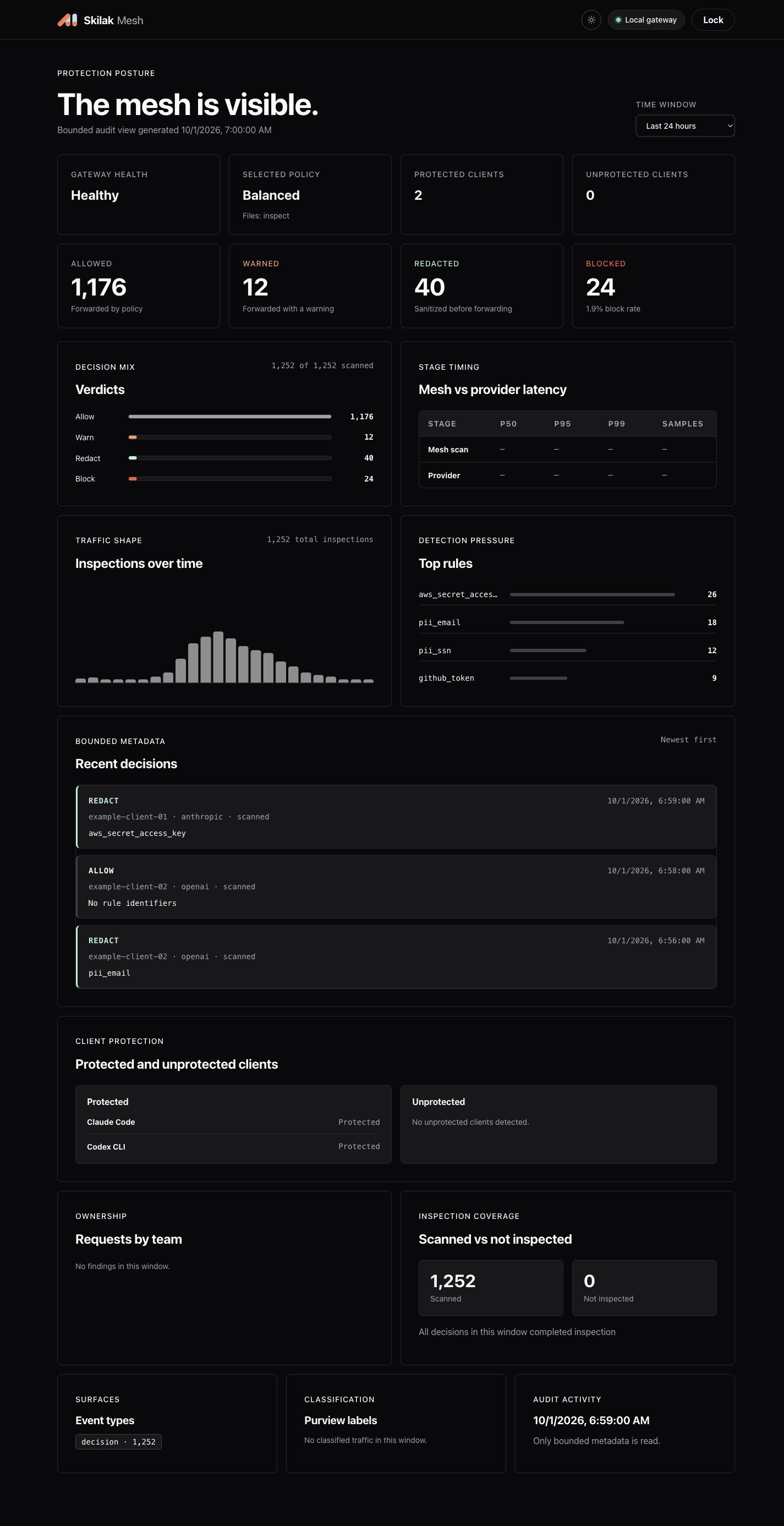 View full dashboard
 See gateway health, the selected policy, file-handling mode, and which clients report protected or unprotected.
Review allowed, warned, redacted, and blocked decisions. Choose a time window to explore inspection trends and frequently matched rules.
Recent decisions show metadata and rule identifiers. Prompts, detected secret values, and document contents stay out of the dashboard.
This is a local operational view of requests routed through Mesh. It does not display private request content or prove that every app on the computer uses the gateway.
Who it is for
Engineers want the best models. Their organizations need credentials and customer records kept off third-party servers. Mesh lets them have both.
Software engineers
Use Claude Code and Codex as usual. Mesh scans each outbound prompt and tool payload and redacts API keys, passwords, and tokens before the request leaves.
Security and tech leads
Let your team use AI coding agents with rules you can check. A local audit trail records each policy decision without keeping prompt content.
Regulated environments
Block or redact payment cards, Social Security numbers, bank details, and health-plan IDs before the request reaches the model provider.
Advisory and client teams
Work in client codebases without sending client secrets or configuration to an AI provider.
How it works
Mesh runs as a small local gateway. Your AI tool sends its requests to Mesh, Mesh checks them, and then forwards them to the provider you already use.
Your computer
Runs locally
Credentials
Your AI tool keeps its own provider credential. Mesh passes it through to that provider and holds no provider keys of its own.
Egress
Each request is scanned and handled by your policy before it is forwarded to the AI provider.
Audit
Mesh keeps a local audit record of every decision on your computer, without the message content.
Reliability
If a request cannot be scanned, Mesh stops it instead of sending it unchecked.
Agent safety
Mesh can inspect data when an agent sends it through the gateway. It cannot make unrestricted filesystem access inherently safe. Least privilege comes first.
The agent runs in an isolated container or VM.
Only necessary files are mounted to the workspace.
Environment variables and config files are removed from context.
Network blocked except for the route to Mesh.
Short-lived tokens issued through a secure metadata service.
Final boundary scan of prompts, tools, and files.
Licensing
Mesh is proprietary software licensed for free personal non-commercial use, with a free 30-day evaluation for organizations. Commercial and ongoing team deployments require a Company License.
To request a Company License or inquire about small-team terms, contact [email protected] or request via the pilot form.
Specifications
What the current release supports.
127.0.0.1:51737Loopback only. Outbound HTTPS goes to the AI provider you choose.audit.jsonlOn your computer. Decision metadata only, never message content.Clients
Connect your AI tool with one command. Mesh updates its settings for you. Restart the tool and its requests go through Mesh.
Anthropic's coding agent for the terminal.
smesh client connect claude --apply
Both share one Codex configuration, so one command connects both. Works with an API key or a ChatGPT sign-in.
smesh client connect codex --apply
Quickstart
Install Mesh, run the guided setup, and connect your AI tool.
# macOS (Apple silicon or Intel) and Linux x86_64
curl -fsSL https://mesh.skilak.ai/install.sh | sh

# Windows x86_64 (PowerShell)
irm https://mesh.skilak.ai/install.ps1 | iex

# Set up, start, and connect your AI tool
smesh init
smesh start
smesh client connect claude --apply   # or: codex
smesh status
smesh dashboard open
The download page has the install command for each platform. Download page → · smesh on GitHub
Frequently asked questions
Setup, licensing, and what Mesh does with your data.
No. Mesh is an outbound egress gateway: it inspects and redacts what your tools send to providers. Incoming provider responses are relayed unmodified to the client without content inspection.
Any organization can install and evaluate Mesh free for up to 30 days on developer machines, with no contract. Ongoing production use requires a Company License. Skilak offers discretionary no-fee Company Licenses for small teams under 10 people.
A Company License is required for any commercial use, client work, or organizational deployment beyond the 30-day evaluation period, as well as for operating Mesh as a hosted service or distributing it to customers.
Mesh is built to fail closed by default if traffic is directed to a stopped gateway. You can run 'smesh client pause' to cleanly restore direct provider routes before maintenance, and 'smesh client resume' when ready.
No. Mesh has no telemetry, no tracking, and nothing that phones home. Audit records stay on your computer.
With a single command: 'smesh client connect claude --apply' or 'smesh client connect codex --apply'. Mesh updates the tool's settings; restart the tool and its requests go through Mesh.
Yes, Dashboard Lite is included with the CLI; run smesh dashboard open for a local, loopback-only view of protection status, decisions and recent activity; prompts and secret values are never shown.
Install it yourself in a minute. No account needed.